Control Portal
v1.0.0Embedded MQTT Specifications and Example Code
The following page is based on requested CSE switch modifications to provide remote command-and-control. The key idea is that there are two levels to how things get connected:
- The bottom layer is Wireguard, to provide encrypted base point-to-point connectivity to the remote end, and
- MQTT, to provide an upper layer publish/subscribe interface to the agent.
Connectivity-wise, this looks like the following:
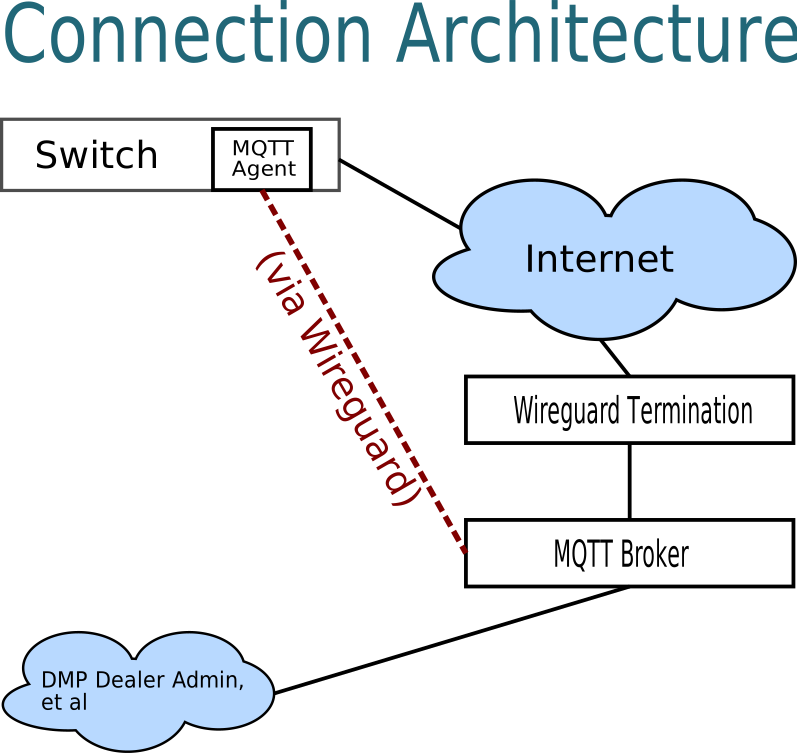
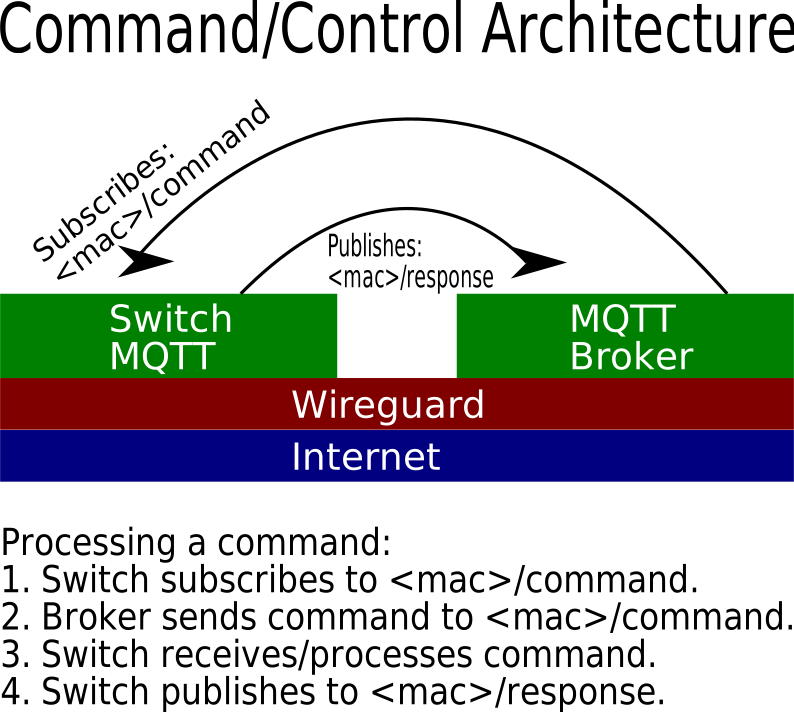
From the switch's perspective, the agent is required to connect to the MQTT broker and subscribe to an MQTT topic based on the MAC address of the switch in the form of mac/command. As the agent receives commands, it processes them and them publishes its response on a topic of the form mac/response. The payload is in JSON format based on the command parameters.
For example, on the switch with MAC 00:de:ad:be:ef:01, the switch should:
- Subscribe to the topic
00:de:ad:be:ef:01/command, - Receive JSON command requests on that topic and process them, and
- Respond by publishing to the topic
00:de:ad:be:ef:01/response.
As an architecture stack, this looks like the following:
Configuration Options
Ultimately the switch will need to have the following configuration options available to be set to connect to this system:
- Wireguard Private Key: The private key used to authenticate this switch.
- Wireguard Local IP: The switch's local IP (i.e. the IP on the switch's side of the tunnel).
- Wireguard Termination IP/Port: The IP/Port used to connect to the WG termination point.
- Wireguard Termination Pubkey: The Public Key used to authenticate the WG termination point.
- Wireguard Termination Allowed IP CIDR: The IP range allowed for the remote end.
- MQTT Broker IP: The IP of the MQTT broker.
- MQTT Broker Port: The TCP port of the MQTT broker.
Note that all IPs *may* be either IPv4 *or* IPv6.
Command Payload
Commands will vary in their specific options, but generally they will be in JSON format and look something like this:
{
    "cmd": "poe_enable_set",
    "port": 1,
    "enabled": 0
}
NOTE: This is just an example, the source code for the client will be the ultimate guide.
The response will be either a simple acknowledgement in JSON or an info dump, as in a call to sys_info_get:
{
    "cmd": "sys_info_get",
    "system_name": "8P-MA-POE-V2",
    "mac_address": "38:73:EA:AA:87:4E",
    "firmware_version": "2.03.xx",
    "uptime": 12345
}
NOTE: Again, this is a general example and not normative.
Example Code and Development Resources
To help jumpstart development, a number of resources are available to speed both implementation and testing:
- An example client program, which will act as the MQTT client above. It will reach out to an MQTT broker and subscribe to
mac/command, parse incoming JSON commands, and dispatch to functions based on thecmditem. It's README.md documents in markdown the various commands it supports and their parameters, acting as API documentation. - An example VirtualBox OVA that has a precompiled version of that client and is a tiny Alpine-based Linux distribution that shows how to configure the Wireguard and MQTT agents.
- (See Available Tools Below) An MQTT console that allows you to publish/subscribe to any listening agents on this system. Note that it is a sandbox and therefore NOT connected to anything interesting (it's just a test AWS instance) on this very mqtt.tacocat.us machine.